
What we were trying to do
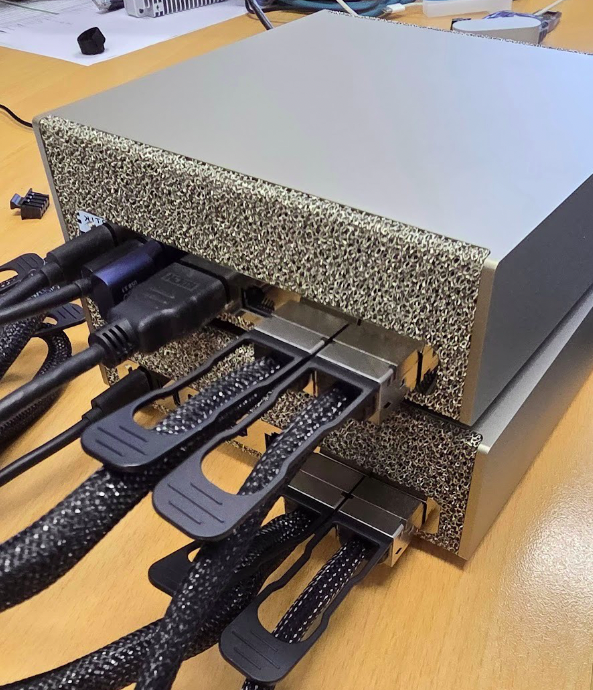
We have two NVIDIA DGX Spark workstations in our lab. Think of these as desktop-sized AI supercomputers. Each one is built around NVIDIA's GB10 "superchip" — a single piece of silicon that combines an ARM-based Grace CPU, a Blackwell-generation GPU, and around 128 GB of memory that both the CPU and GPU share directly. That shared memory is the unusual bit: on a normal computer the CPU and GPU each have their own memory and have to copy data back and forth, which is slow. On the DGX Spark, they don't.
One DGX is useful on its own. Two DGXes working together is more useful — but only if they can talk to each other fast enough. AI training jobs constantly shuffle huge amounts of data between machines, and if the network is slow, the GPUs sit idle waiting. So before doing any actual AI work, we wanted to know: how fast can these two machines actually communicate?
Each DGX Spark has two high-speed network ports on a Mellanox/NVIDIA ConnectX-7 network card, each rated at 200 gigabits per second — that's about 200 times faster than the gigabit network ports on a typical home router. Between the two DGXes we placed a switch (a MikroTik CRS804-4DDQ) that has four ports each capable of 400 gigabits per second, so it's never going to be the bottleneck. We used DAC (direct-attach copper) cables — short, thick cables with the optics built into the connectors. On paper, this setup should fly.
? We supply all the necessary hardware: NVIDIA DGX Spark and Mikrotik CRS804-4DDQ.
The first attempt: disappointing
We connected the two machines with a single cable and ran iperf3, the standard tool for measuring network bandwidth between two Linux machines. It works the same way as an internet speed test: open a TCP connection, send data as fast as possible, measure how much got through.
Result: 96 gigabits per second. That's only half of what the cable should be capable of.
This is actually normal. Out of the box, every part of the chain — the network card, the operating system, the switch — is tuned for safety and compatibility rather than raw speed. So we started turning knobs:
- Jumbo frames. By default every chunk of network data, called a "packet," is limited to about 1,500 bytes. That number is a holdover from the 1980s. We increased it to 9,000 bytes — the modern "jumbo frame" size. Fewer packets to process means less work per gigabit.
- Bigger socket buffers. When data flies in at 200 gigabits per second, the receiving computer needs somewhere to hold it while it waits to be processed. The default memory buffer (controlled by a Linux setting called
tcp_rmem) was about 6 megabytes. We bumped it up to 128 megabytes per connection. - Switch reconfiguration. The switch had its own defaults that needed adjusting — we had to explicitly tell it the cable speed (200G with FEC91 error correction), turn off auto-negotiation, and raise its internal packet size limit. RouterOS, the switch's operating system, made this surprisingly fiddly.
After all that effort, the result climbed to... 98 gigabits per second. A whole 2% improvement.
Something else was getting in the way.
The first surprise: one cable, two network cards
Looking closer at how Linux saw the network connection, we noticed each DGX reported two network interfaces, both at 200 Gbit/s, even though only one cable was plugged in. This is a feature of the ConnectX-7 chip called Multi-Host: a single physical 200 Gbit/s port is presented to the operating system as two separate logical network cards, each able to handle about 100 Gbit/s of traffic independently. The two logical halves share the wire.
This explained why we kept hitting ~100 Gbit/s: a single TCP test only uses one of the two halves. When we ran two parallel TCP tests, one per logical card, the total jumped to 177 Gbit/s — 88% of the cable's physical capacity. Better. But still not full speed.
The second surprise: the CPU is the wall
We tried adding a second cable per machine (each DGX has two physical ports). With four logical network cards in parallel across two cables, we expected the number to roughly double. Instead it stayed at 172 Gbit/s total. Adding more cables didn't help at all.
The bottleneck wasn't the cable or the switch. It was the CPU itself.
Here's the thing: when you use normal TCP/IP networking (the same kind your web browser uses to load this page), every byte of data has to be processed by the computer's CPU. The CPU breaks data into packets, adds headers, calculates checksums, copies it around in memory, hands it to the network card, handles acknowledgments coming back. At slow speeds this is fine. At 200 gigabits per second, the CPU is fully consumed doing this paperwork. The Grace CPU in the DGX Spark, fast as it is, simply cannot push more than about 170-180 Gbit/s of TCP traffic — no matter how many cables you give it.
The fix was to stop using the CPU for networking at all.
The breakthrough: RDMA and NCCL
There's a technology called RDMA — Remote Direct Memory Access — designed exactly for this. Instead of the CPU shuffling data through the operating system, the network card reads memory directly and sends it across the wire on its own. The CPU just tells the network card "send this chunk of memory to that other computer" and goes to sleep. The network card handles every byte in dedicated silicon, including breaking it into packets, retransmits, congestion control, all of it.
On Ethernet, RDMA runs over a protocol called RoCEv2 (RDMA over Converged Ethernet), which is what NVIDIA's ConnectX cards are designed for.
To actually use RDMA, we switched from iperf3 to NCCL — NVIDIA's library that every serious AI training framework (PyTorch, TensorFlow, JAX) uses to coordinate work between GPUs. NCCL is designed to use RDMA whenever it's available. It's also the actual workload these machines will run in real use, so the measurement is the honest one: it's what real AI training will see.
The setup involved installing NCCL and OpenMPI, building a small benchmark called nccl-tests, setting up passwordless SSH between the two machines so the test could launch processes on both, and pointing NCCL at all four of the RoCE-capable network devices.
The result
With NCCL and RDMA, communicating GPU-to-GPU across the network:
326 gigabits per second of useful data, with peak instantaneous bursts of 340 gigabits per second measured directly from the network cards' physical-layer byte counters.
For perspective:
- That's about 40 gigabytes per second of data moving between the two machines.
- You could copy a typical Blu-ray movie in roughly one second.
- The entire English Wikipedia (about 20 GB of text) would transfer in under a second.
- And while this is happening, the CPUs of both machines are essentially idle — usually less than 5% utilization.
The transfer is so efficient that the limit isn't the computer's processing power — it's the actual physical capacity of the two cables.
Why the CPU sits idle while 340 gigabits fly through
This is the elegant part. When RDMA is in use:
- NCCL writes a tiny "work request" — basically a sticky note saying "send N bytes from memory address X to the other computer's address Y" — into a hardware queue on the network card.
- The network card's silicon reads the work request, fetches the data directly from memory through PCIe, packetizes it, and pushes it onto the wire.
- The other network card receives the packets, reassembles them, and writes the result directly into the destination machine's memory.
- Both CPUs get a "done" notification when the transfer completes.
Total CPU work involved per transfer: a few hundred nanoseconds at the start to write the work request, a few hundred at the end to read the completion. Everything in between — gigabytes of actual data — is handled entirely by the network card hardware.
This is exactly what NVIDIA designed the DGX Spark platform to do. Because the GB10 chip has the CPU, GPU, and memory all bundled together, "GPU memory" and "CPU memory" are actually the same memory chips, just viewed differently. The network card can read straight from the GPU's data with no copying. On a traditional desktop with a separate graphics card, data would have to be copied from GPU memory to CPU memory first — adding overhead and slowing things down. On the DGX, that copy doesn't exist.
What this means in practice
For training AI models that don't fit on a single GPU, this matters enormously. A modern large language model might need to share intermediate results between GPUs thousands of times during training. With 326 Gbit/s and no CPU overhead, the GPUs spend their time computing rather than waiting for data. That's the difference between a useful cluster and an expensive curiosity.
It also means: the second cable per machine isn't bandwidth doubling. Each cable carries 200 Gbit/s in each direction simultaneously (it's "full duplex"), so two cables give us 800 Gbit/s of theoretical wire capacity. We're using about 40% of that with default NCCL settings. There's almost certainly more available with deeper tuning. But for our current measurement, the second cable mostly buys redundancy: if one cable or one network card fails, the cluster keeps running on the other.
For us, this exercise confirms the platform delivers what's promised — as long as you measure it the right way. If you'd asked us "how fast can these two DGXes talk?" using a conventional speed test, we'd have said 170 Gbit/s — the limit of what the CPU can push through Linux's networking stack. But that's not how the machines actually communicate when doing AI work. With the right protocol — the one the workloads themselves use — we get almost twice that, and the CPUs stay free for real work.
The takeaway
Four numbers to remember:
| What we measured | Result | Bottleneck |
|---|---|---|
| TCP, one cable, untuned | 96 Gbit/s | Default settings |
| TCP, one cable, tuned (jumbo frames + buffers) | 177 Gbit/s | CPU |
| TCP, two cables, all knobs turned | 172 Gbit/s | Still CPU |
| NCCL/RDMA, two cables | 326 Gbit/s | The wire itself |
| Peak observed on the wire | 340 Gbit/s | — |
Same hardware. Same cables. Same switch. The 3.4× improvement from the first number to the last is entirely about software architecture — choosing a protocol that lets the network card do its job without the CPU getting in the way.
When people quote bandwidth numbers for AI clusters, this is the number they mean. And now we can quote it for our own setup.